
Notion has become a cornerstone for productivity, managing everything from notes and projects to databases and documentation. Yet, its native automation often falls short for complex business needs. This is where n8n, an open-source automation platform, transforms Notion into a near-limitless automation engine. This guide explores how Notion and n8n combine to unlock a new level of productivity for your business.
01 What is n8n and Why It Matters for Your Business
n8n (pronounced "n-eight-n") is an open-source, extendable workflow automation tool that stands apart from traditional solutions like Zapier or Make. Its key advantage lies in its ability to handle complex, multi-step workflows without incurring prohibitive costs, especially at scale. For businesses looking to integrate Notion with other tools, synchronize databases, or build advanced workflow logic, n8n provides a robust and cost-effective solution.
With n8n, your business can connect diverse applications and services within a single, cohesive workflow. You can implement advanced logic such as loops, branching, and conditional filters to guide automation intelligently. n8n allows you to transform data using either code or no-code options, adapting to your team's technical comfort. You can trigger or schedule workflows based on specific events or predetermined times, integrate with virtually any API, and build complex business automation without the need for extensive custom application development.
While Notion excels at storing and organizing information, it was not designed to execute intricate business logic. n8n perfectly complements Notion by filling this automation gap, allowing your data to become an active participant in your business processes.
02 Why Integrate Notion With n8n? Bridging the Automation Gap
Many businesses find Notion's native automation capabilities too basic for their evolving needs. Integrating Notion with n8n addresses these limitations directly, offering a powerful solution for enhanced productivity and operational efficiency.
Notion's Limited Native Automation
While Notion offers basic integrations with tools like Zapier and Make, it lacks the sophistication required for true business automation. Its limitations include the inability to chain multiple actions based on a single trigger, difficulty in creating workflows that adapt based on specific data conditions, lack of functionality to process lists or collections of items systematically, reliance on polling rather than instant event-driven automation, and limited direct control over its API for advanced use cases.
n8n's flexible workflow architecture is specifically designed to overcome these challenges, providing the granular control and complexity that Notion users often seek.
Connecting Notion to Any Application
Notion's built-in integrations are confined to a select few platforms. n8n breaks these barriers, allowing your Notion workspace to connect with a vast ecosystem of tools. You can integrate with communication platforms like Slack and Microsoft Teams, project management tools including Trello, Jira, Asana, and GitHub, CRM systems such as HubSpot and Salesforce, email services like Gmail and Outlook, AI models including OpenAI, Claude, and Gemini, and databases such as MongoDB, PostgreSQL, and MySQL.
This extensive connectivity transforms Notion into a central command center, orchestrating data and tasks across your entire operational landscape.
Building True Business Automation
Modern business automation extends far beyond simple reminders. With n8n, you can build sophisticated workflows that drive efficiency and strategic advantage. You can automatically generate meeting summaries or project reports, keep CRM and Notion databases perfectly aligned, streamline content creation, approval, and publishing processes, automate requests, notifications, and status updates for various business processes, and generate real-time reports and dashboards directly within Notion.
n8n empowers your business to implement these and many other complex automations, turning Notion into a dynamic operational hub.
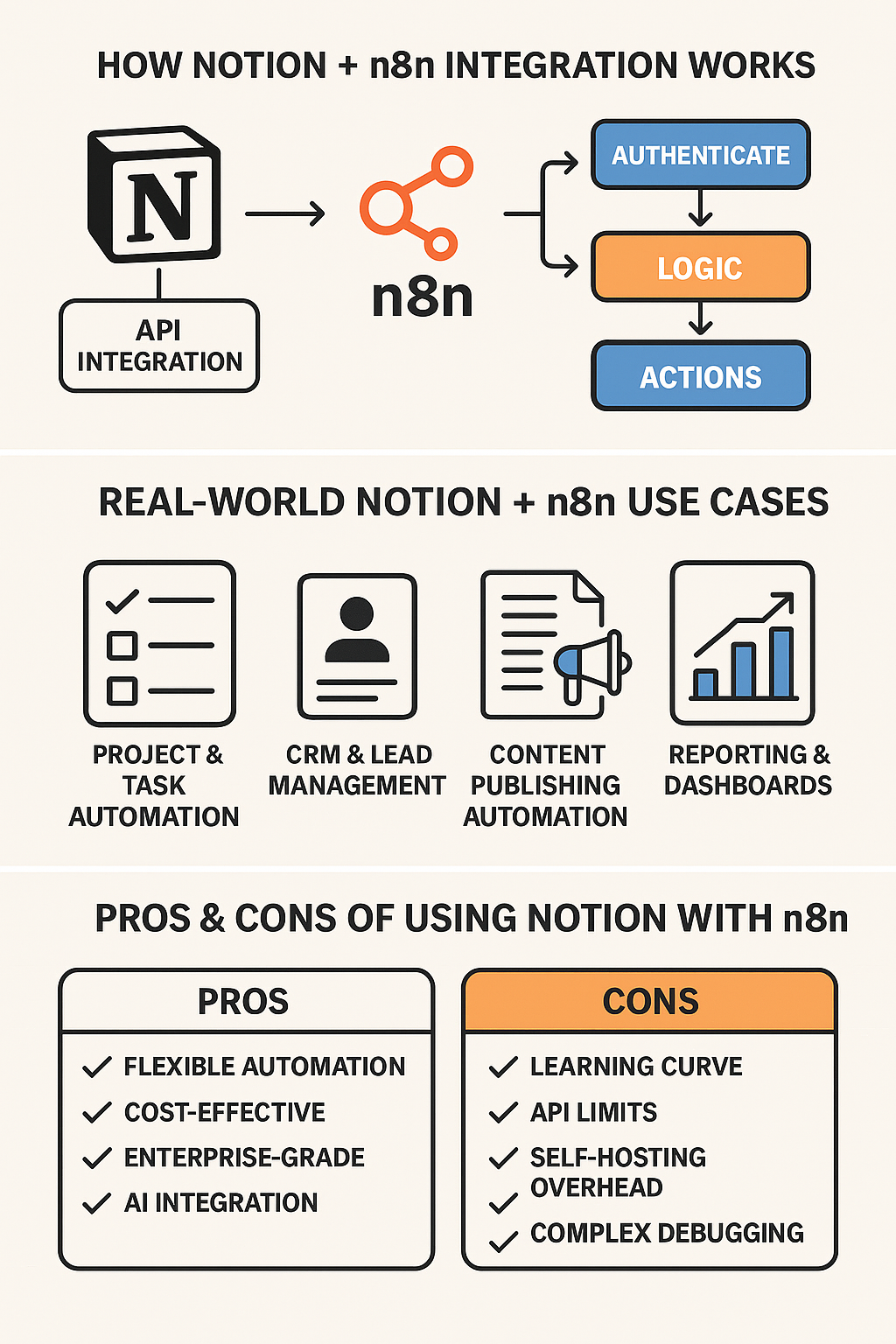
03 How Notion + n8n Integration Works: A Technical Deep Dive
The integration between Notion and n8n is primarily facilitated by the Notion API, which exposes your workspace's pages, databases, blocks, users, and comments. Understanding this technical foundation is key to leveraging the full power of this combination.
Step 1: Connecting Notion to n8n
The initial setup involves establishing a secure connection between your Notion workspace and n8n. First, navigate to Settings & Members in Notion and create a new internal API integration. Copy the integration token that grants n8n the necessary permissions. Under Credentials in n8n, add a new Notion credential using the copied token. Finally, grant the integration access to the specific Notion pages and databases it needs to interact with.
Once connected, n8n has the authorization to read from and write to your designated Notion workspace elements, enabling seamless data flow between systems.
Step 2: Building Workflows With Notion Nodes
n8n provides a suite of dedicated Notion nodes that allow you to interact with your data programmatically. You can query databases to retrieve specific data sets, update pages to modify existing Notion content, retrieve blocks to access individual content blocks, append blocks to add new content, create pages to generate new Notion pages, search pages to find content based on specific criteria, and add comments to Notion content programmatically.
These Notion-specific nodes can be combined with other n8n nodes, such as HTTP Request, Google Sheets, Slack, Webhook, Cron, or various AI nodes, to construct highly customized and powerful automation sequences tailored to your unique business needs.
Step 3: Adding Advanced Workflow Logic
n8n's strength lies in its ability to incorporate sophisticated logic into your workflows, enabling intelligent and adaptive automation. You can create conditional paths based on data values using IF/Else branching, direct workflow execution to different branches based on multiple conditions using Switch nodes, iterate through database items or lists using Loops, format and transform data between different steps using Set nodes, execute custom JavaScript for highly specific data manipulation using Code nodes, define actions to take when errors occur using Error triggers, and control the timing and frequency of workflow execution using Timers and schedules.
This robust logic layer allows you to build automations that are not merely reactive but intelligently responsive to dynamic business conditions.
04 Real-World Use Cases: Notion + n8n in Action Across Industries
The synergy between Notion and n8n unlocks a multitude of practical applications, transforming how teams operate across various industries. These examples demonstrate how businesses are leveraging this integration to streamline operations and enhance productivity.
Automated Task and Project Syncing
Many organizations use Notion for high-level planning while relying on specialized tools like Jira, Asana, GitHub Issues, or Trello for task execution. n8n facilitates seamless synchronization by creating tasks in Notion and automatically replicating them in your preferred project management tool. You can keep task statuses updated across all platforms, ensuring everyone has the latest information. n8n can trigger Slack messages or email alerts when project milestones are reached or GitHub issues are closed, ensuring consistent alignment across teams, regardless of their preferred tool.
CRM and Lead Management Automation
Notion has emerged as a popular choice for lightweight CRM. n8n enhances this capability by automating critical lead management processes. You can create new Notion leads directly from website forms, sync customer data from HubSpot or Salesforce into Notion, send personalized follow-up emails based on lead status or activity, automatically categorize leads as they progress through the sales funnel, and generate comprehensive reports directly into Notion databases. This transforms Notion into a fully automated, responsive CRM hub.
Automated Reporting and Dashboards
n8n excels at collecting, processing, and reporting data from diverse sources, then writing the results back to Notion. This capability saves countless hours of manual effort. You can automatically compile and present key performance indicators in weekly KPI reports, consolidate numbers from multiple spreadsheets, APIs, or databases, auto-populate Notion dashboards with real-time data visualizations, and generate PDF reports or send summaries via Slack or email. This ensures stakeholders always have access to up-to-date, actionable insights.
Content Creation and Publishing Workflows
For teams managing content pipelines in Notion, n8n automates various stages of the content lifecycle. You can publish blog posts directly from Notion to WordPress or Ghost, translate content using AI models before publishing, automate the scheduling and release of content, and create social media posts directly from Notion pages, potentially even generating images and captions using AI tools. This streamlines content operations, from ideation to distribution.
AI-Enhanced Document Automation
This is where the integration truly shines, transforming Notion into an intelligent writing and research platform. You can convert raw meeting notes into structured action items using GPT, generate comprehensive documentation from research notes, draft articles, reports, or summaries using integrated AI models, and build custom AI assistants that leverage your Notion knowledge base. This significantly enhances the value and utility of your Notion content.
Approval Workflows
Notion is frequently used for managing approval processes such as content, budget, and proposals. n8n automates these critical workflows by automatically detecting new requests added to Notion databases, assigning approvers based on predefined rules or roles, notifying relevant parties via Slack or email, updating approval statuses in Notion automatically, logging all approval actions for compliance and record-keeping, and informing the requester upon approval or rejection. This eliminates manual tracking and accelerates decision-making.
05 Advantages of Using n8n With Notion: Beyond Standard Automation
Integrating n8n with Notion offers distinct advantages that go beyond the capabilities of standard automation tools, providing businesses with unparalleled flexibility, cost efficiency, and data control.
Flexibility Beyond Any Standard Automation Tool
Unlike more restrictive platforms, n8n provides a level of flexibility essential for complex business environments. You can design intricate, multi-branch workflows without limitations, directly interact with APIs for granular control over integrations, manipulate and format data precisely to meet specific requirements, implement sophisticated error management including retries and notifications, and extend functionality with custom JavaScript code when needed. This enterprise-grade flexibility allows n8n to support even the most demanding automation needs at a fraction of the cost of proprietary solutions.
Cost Efficiency Through Open-Source
Proprietary automation tools can become prohibitively expensive as your operations scale, especially with high-frequency workflows or AI integrations. n8n offers significant cost advantages by allowing you to deploy n8n on your own infrastructure for free, eliminating subscription fees, and run n8n on affordable cloud services, minimizing operational expenses. This cost-effectiveness makes advanced automation accessible to businesses of all sizes, allowing for scaling without proportional cost increases.
Enterprise-Grade Data Control
For businesses handling sensitive or proprietary information, data control is paramount. Self-hosting n8n provides full data sovereignty, allowing you to maintain complete control over your data and ensure it never leaves your environment. You can meet stringent regulatory requirements such as PIPEDA in Canada by keeping data within your jurisdiction, and reduce reliance on third-party servers, mitigating risks associated with external data processing. This level of control is crucial for maintaining security and compliance in today's data-sensitive landscape.
Integration With Any API or Tool
While Notion's ecosystem is limited, n8n's extensibility ensures connectivity with virtually any system. You can integrate with internal and on-premise systems, connect with a wide array of cloud-based platforms, seamlessly integrate with various AI models for advanced capabilities, and connect to any database for data synchronization and manipulation. Even if a tool lacks an official n8n connector, the HTTP Request node allows for custom API integrations, ensuring no system is left behind.
End-to-End Automation Possibilities
The combination of Notion and n8n enables the creation of comprehensive, end-to-end business systems. You can build a complete customer relationship management system within Notion, streamline the onboarding process with automated tasks and notifications, create dynamic, AI-powered knowledge repositories, automate the entire content lifecycle from creation to distribution, develop dashboards that provide actionable insights driven by AI, and coordinate complex workflows across disparate applications. The possibilities are truly endless, allowing businesses to design and implement highly customized operational frameworks.
06 Limitations and Challenges: Navigating the n8n + Notion Landscape
Despite its immense power, the n8n + Notion integration presents certain limitations and challenges that businesses should be aware of to ensure successful implementation.
Notion API Limitations
While the Notion API is continually improving, it still has some constraints that can impact automation design. The API often lacks real-time webhooks and requires scheduled polling, which can introduce latency. Performing mass updates can be less efficient than desired. Some complex filtering capabilities are not yet fully exposed, and certain Notion property types such as formulas have limited API interaction.
These limitations mean that automations often need to be designed with scheduled polling workflows, requiring careful optimization to avoid hitting rate limits.
Requires Technical Understanding
Compared to more user-friendly, no-code platforms, n8n requires a greater degree of technical proficiency. Setting up intricate workflows demands a structured approach and understanding of logic. Proficiency in working with JSON data is often necessary for data transformation. Diagnosing and resolving issues within workflows requires technical skill, and deploying and maintaining a self-hosted n8n instance requires DevOps knowledge.
Non-technical teams may face a learning curve, and it's crucial to account for this in resource planning.
Rate Limits
Notion enforces API rate limits to ensure system stability. These limits can affect automations involving large databases with frequent queries or updates, high-frequency polling that rapidly checks for changes in Notion, and multiple updates per minute that perform numerous write operations in a short period. n8n can help optimize API calls, but thoughtful workflow design is essential to manage and stay within these limits, preventing interruptions to your automation.
Maintenance Overhead
Implementing more automation inevitably leads to increased maintenance responsibilities. A growing number of workflows requires systematic organization and monitoring. Changes in business processes necessitate updates to workflow logic. Keeping track of integrations and their dependencies across applications becomes increasingly complex. Organizations must plan for this long-term maintenance overhead to ensure their automation remains effective and reliable.
07 Best Practices for Building Robust Notion + n8n Workflows
To maximize the benefits and mitigate the challenges of Notion + n8n integration, adhering to best practices is crucial for building scalable, efficient, and resilient automation solutions.
Use incremental sync by optimizing API usage and querying only recently changed items, significantly reducing the risk of hitting rate limits. Add error-handling nodes to implement comprehensive error management, including retries, notifications, and fallback mechanisms, ensuring workflow resilience. Utilize cache nodes to reduce redundant API calls for frequently accessed data by implementing caching strategies.
Batch Notion updates by combining multiple updates into single API calls whenever possible to minimize interactions and improve efficiency. Employ UUIDs or unique keys to prevent data duplication and maintain data integrity by using unique identifiers in your databases. Document workflows thoroughly, especially for complex automations interacting with multiple databases, as clear documentation is vital for understanding, maintenance, and collaboration.
Test extensively using dummy entries and simulated scenarios to rigorously test workflows before deploying them to production, ensuring stability and accuracy. These practices form the foundation of reliable, maintainable automation systems.
08 The Future of Notion + n8n Integration: An Evolving Landscape
The integration landscape is dynamic, and the synergy between Notion and n8n is poised for further evolution. We can anticipate several advancements that will make this combination even more powerful. Notion is likely to release more robust API features, including native webhook support, improved bulk operations, and advanced filtering capabilities. Future iterations may offer intelligent, AI-powered suggestions for mapping data fields between applications.
More sophisticated mechanisms for instant, bidirectional data sync will emerge, and tools for managing and automating version control for Notion content will become more prevalent. A wider array of pre-built, industry-specific templates will simplify complex deployments. As automation becomes increasingly integral to knowledge work, platforms like n8n will continue to play a central role in extending Notion's capabilities, transforming it into a truly dynamic operating system for businesses.
Ready to Transform Your Notion Workspace Into an Automated Powerhouse?
JetX Media specializes in building secure, high-impact AI workflow solutions. From custom OpenClaw implementations with n8n backbones to comprehensive AI Workflow Audits, we ensure your automation strategy aligns with your business goals and compliance needs. Let's discuss how we can help you navigate the agentic AI landscape and implement solutions that deliver measurable ROI.