
The Ultimate AI Guide to Notion + n8n Integration: Automate Everything Inside and Around Notion

Notion using n8n


Notion has become one of the most popular productivity tools on the planet—powerful enough to manage notes, projects, databases, and documentation all in one place. But as impressive as Notion is, one area where users still feel limitations is automation. Notion’s native automation features are fairly basic, offering simple reminders and integrations such as Slack or Google Calendar. When teams want to integrate Notion with other tools, update databases automatically, or build more advanced workflow logic, they often hit a wall.

This is exactly where n8n (pronounced “n-eight-n”) steps in.

n8n is an open-source automation platform that allows you to create complex workflows, connect APIs, synchronize databases, and automate business operations. When combined with Notion’s powerful workspace structure, the two create a near-limitless automation engine.

In this comprehensive guide, we will explore everything you need to know about Notion + n8n integration—from how it works, to real-world use cases, to pros and cons, and the exact steps needed to build powerful workflows.

Whether you’re a project manager, developer, creator, or automation enthusiast, this guide will show you how to unlock a new level of productivity.

What is n8n and Why Does It Matter?

n8n is an open-source, extendable workflow automation tool and integration platform. Unlike tools such as Zapier or Make, which can become expensive at scale, n8n can be self-hosted for free, making it cost-effective for businesses handling thousands of operations.

It’s built for automation that goes beyond simple one-step triggers. With n8n, you can:

  • Connect multiple apps and services in a single workflow
  • Add logic like loops, branching, and conditional filters
  • Transform data using code or no-code options
  • Trigger or schedule workflows
  • Integrate with any API
  • Build complex business automation without writing full applications

While Notion stores information beautifully, it isn’t designed to run automated business logic. That’s what makes n8n such a perfect pairing—it fills in every automation gap Notion has.

Why Integrate Notion With n8n?

There are many reasons why Notion users look for outside automation platforms:

Notion Has Limited Native Automation

While Notion supports integrations with Zapier, Make, and a few other tools, it lacks:

  • Multi-step workflows
  • Conditional logic
  • Iterative processing
  • Real-time triggers
  • Robust API-based automation

n8n solves this gap with its flexible workflow architecture.

You Can Connect Notion to Any App

Notion’s own integrations are limited. With n8n, you can integrate Notion with:

  • Slack
  • Trello
  • Jira
  • HubSpot
  • GitHub
  • Google Sheets
  • Email services
  • AI models (OpenAI, Claude, Gemini)
  • Databases (MongoDB, Postgres, MySQL)

This allows you to use Notion as a command center for your operations.

You Can Build True Business Automation

Automation is no longer just about reminders or task creation. Businesses need workflows such as:

  • Auto-generating meeting documentation
  • Syncing customer data between CRM and Notion
  • Creating content pipelines
  • Triggering approval flows
  • Generating dashboards

n8n enables all of these possibilities.

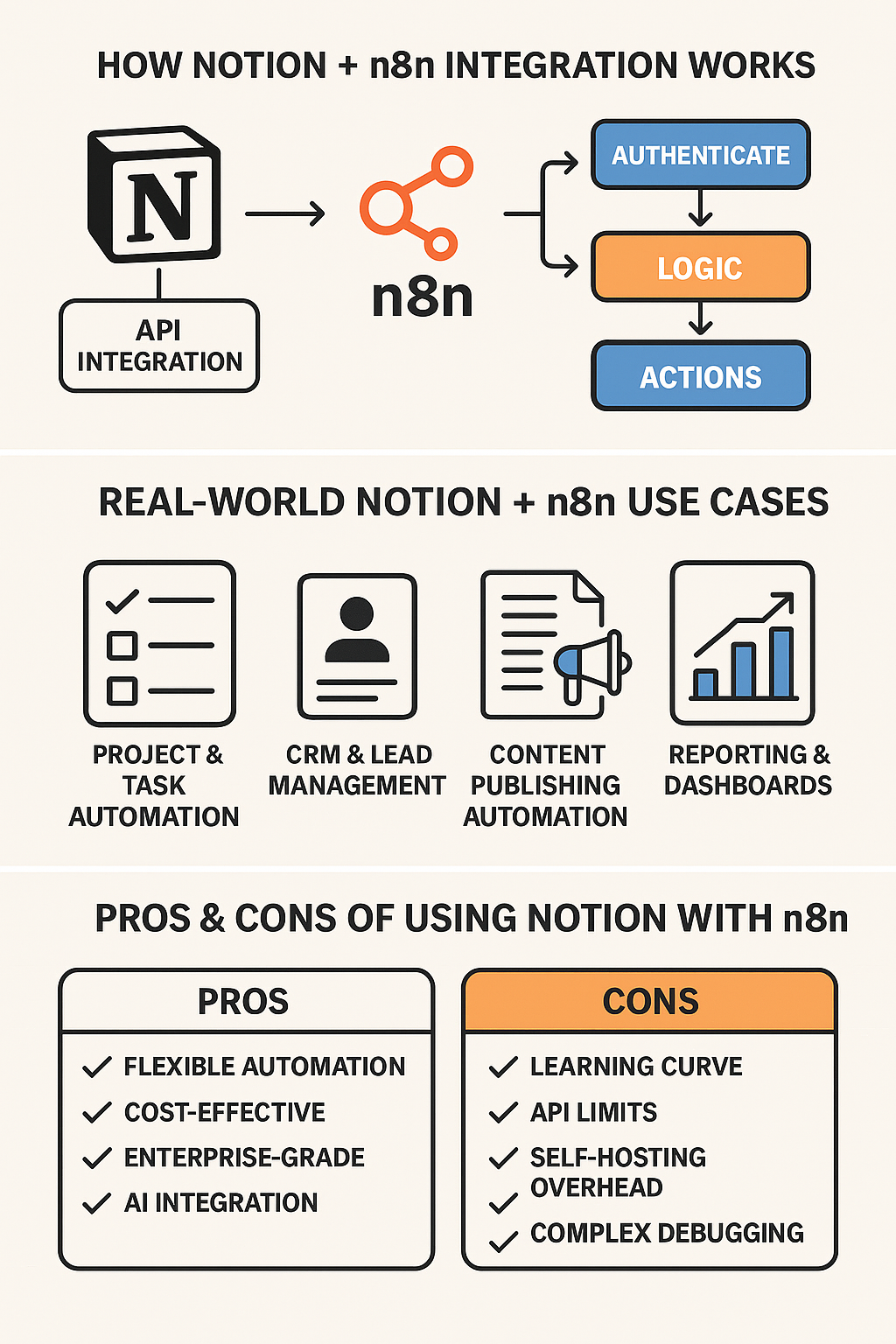
How Notion + n8n Integration Works

The integration between Notion and n8n is primarily powered by the Notion API. Notion exposes your pages, databases, blocks, users, and comments through API endpoints.

Here’s the basic process.

Step 1: Connect Notion to n8n

You start by creating an integration in Notion:

  1. Go to Settings & MembersIntegrations
  2. Create a new API integration
  3. Copy the internal integration token
  4. Connect it in n8n under Credentials → Notion
  5. Share specific pages/databases with the integration

Now n8n has permission to read and write to your Notion workspace.

Step 2: Build Workflows With Notion Nodes

n8n contains several Notion node operations such as:

  • Query database
  • Update pages
  • Retrieve blocks
  • Append blocks
  • Create pages
  • Search pages
  • Add comments

You can connect them with other nodes, such as:

  • HTTP Request
  • Google Sheets
  • Slack
  • Webhook
  • Cron
  • AI nodes

This is where automation begins to take shape.

Step 3: Add Workflow Logic

You can add advanced logic to your workflows using:

  • IF/Else branching
  • Switch nodes
  • Loops (e.g., iterate through database items)
  • Set nodes (format or map data)
  • Code nodes (JavaScript)
  • Error triggers
  • Timers and schedules

This allows you to build automation that behaves intelligently, not just reactively.

Real-World Use Cases of Notion + n8n Integration

Now let’s explore where the combination truly shines. These use cases reflect what teams are actually doing with Notion and n8n across industries.

Automated Task and Project Syncing

Many teams use Notion for planning but rely on tools like Jira, Asana, GitHub Issues, or Trello for execution.

With n8n, you can:

  • Create tasks in Notion and automatically sync them to other project tools
  • Keep task status updated bidirectionally
  • Trigger Notion updates when GitHub issues are closed
  • Send Slack messages when project milestones are reached

This ensures every stakeholder stays aligned, regardless of which tool they use.

CRM and Lead Management Automation

Notion has become surprisingly popular as a lightweight CRM.

With n8n, you can enhance it by:

  • Creating Notion leads from website forms
  • Syncing sales data from HubSpot or Salesforce
  • Sending automated follow-up emails
  • Tagging leads when they reach certain stages
  • Generating reports directly into Notion databases

This turns Notion into a fully automated CRM hub.

Automated Reporting and Dashboards

n8n can perform data collection, processing, and reporting from any connected tool—and write results back to Notion.

Example workflows:

  • Weekly KPI report creation
  • Aggregating numbers from multiple spreadsheets or APIs
  • Auto-populating Notion dashboards
  • Generating PDF reports
  • Sending summaries via Slack or email

This saves hours of manual reporting time each week.

Content Creation and Publishing Workflows

Teams that use Notion for content planning can automate:

  • Publishing blog posts to WordPress or Ghost
  • Translating content using AI before publishing
  • Scheduling posts automatically
  • Creating social media content from Notion pages

n8n can even generate images, captions, or metadata using AI tools.

AI-Enhanced Document Automation

This is where things get exciting.

You can create workflows such as:

  • Convert meeting notes into action items using GPT
  • Generate documentation from raw notes
  • Summarize research and store it in Notion
  • Draft articles or reports using AI
  • Build a personal knowledge assistant

This makes Notion an intelligent writing and research platform—powered by automation.

Approval Workflows

Many teams use Notion for approval processes—content, budget requests, proposals, procurement, etc.

With n8n, you can:

  • Detect when a new request is added
  • Assign approvers based on rules
  • Notify stakeholders via Slack or email
  • Update status automatically
  • Log audit trail data
  • Notify requester upon approval or rejection

This helps eliminate endless Slack messages or manual tracking.

Advantages of Using n8n With Notion

Here are the key benefits organizations gain from tying these two platforms together.

Flexibility Beyond Any Standard Automation Tool

Unlike Zapier or Make, n8n allows:

  • Unlimited workflow complexity
  • API-level customization
  • Conditional processing
  • Advanced data transformation
  • Error handling and retries
  • Custom code injection

This level of automation can support enterprise-level needs at a fraction of the cost.

Cost Efficiency Through Open-Source

Zapier and Make become extremely expensive when:

  • You have thousands of operations
  • You run automation frequently
  • Workflows involve AI or multi-step logic

n8n can be self-hosted for free or run on low-cost cloud infrastructures.

Enterprise-Grade Data Control

Self-hosting gives businesses:

  • Full control of data
  • Compliance advantages
  • No reliance on third-party servers
  • Ability to scale without extra cost

This is crucial for companies handling sensitive or proprietary information.

Integration With Any API or Tool

Notion’s ecosystem is limited, but n8n supports integration with:

  • Internal APIs
  • On-premise systems
  • Legacy applications
  • AI providers
  • Databases
  • Cloud services

Even if a tool has no official connector, you can use the HTTP Request node.

End-to-End Automation Possibilities

You can create entire systems such as:

  • Notion-based CRM
  • Automated employee onboarding
  • Intelligent knowledge bases
  • Content delivery pipelines
  • AI-powered productivity dashboards
  • Multi-system orchestration workflows

The possibilities are endless.

Limitations and Challenges

Despite its power, n8n + Notion integration has some limitations that users should consider.

Notion API Limitations

The Notion API is improving, but still lacks:

  • Real-time webhooks
  • Bulk operations
  • Advanced filtering
  • Some property controls (e.g., formulas)

This means automations must often use scheduled polling workflows.

Requires Technical Understanding

Compared to Zapier:

  • Workflow setup is more complex
  • JSON data handling is often required
  • Error troubleshooting needs skill
  • Managing self-hosting requires DevOps knowledge

Non-technical teams may face a learning curve.

Rate Limits

Notion enforces API limits, which can slow automation involving:

  • Large databases
  • High-frequency polling
  • Multiple updates per minute

n8n helps optimize calls, but it still requires thoughtful design.

Maintenance Overhead

More automation means:

  • More workflows to maintain
  • More logic paths to update
  • More dependencies between apps

Organizations must plan for this long-term.

Best Practices for Building Notion + n8n Workflows

To ensure smooth and scalable automation, follow these guidelines:

  1. Use incremental sync
    Query only recently changed items to avoid hitting rate limits.
  2. Add error-handling nodes
    Build retries, notifications, and safeguards.
  3. Use cache nodes
    Reduce repeated API calls for the same data.
  4. Avoid updating Notion too frequently
    Combine updates into batches if possible.
  5. Use UUID or unique keys in databases
    Prevent duplicate records.
  6. Document workflows
    Especially when workflows interact with multiple databases.
  7. Test extensively
    Use dummy entries to ensure the workflow is stable.

Future of Notion + n8n Integration

The integration landscape is evolving rapidly. We may soon see:

  • Notion releasing built-in webhook support
  • AI-driven field mapping
  • Real-time database sync tools
  • More robust API endpoints
  • Version-controlled Notion content automation
  • Enterprise-grade workflow templates

As automation becomes more essential to knowledge work, platforms like n8n will play a central role in extending Notion into a dynamic operating system for businesses.

Conclusion: Should You Integrate Notion With n8n?

If your goal is to automate workflows, connect multiple tools, or build intelligent business systems around Notion, then yes—Notion + n8n is one of the most powerful integrations available today.

This combination enables you to:

  • Automate repetitive work
  • Eliminate manual data entry
  • Build AI-enhanced solutions
  • Unify tools under a single source of truth
  • Save dozens of hours every week
  • Scale operations without scaling costs

Whether you’re automating project pipelines, content workflows, CRM processes, reporting frameworks, or AI document generation, n8n unlocks the full potential of your Notion workspace.

It transforms Notion from a powerful documentation tool into a fully automated business engine.


Get Started Now

🚀 Let’s build something extraordinary together. Contact us today for a free consultation!

Contact us